
Free Stream Overlay Maker
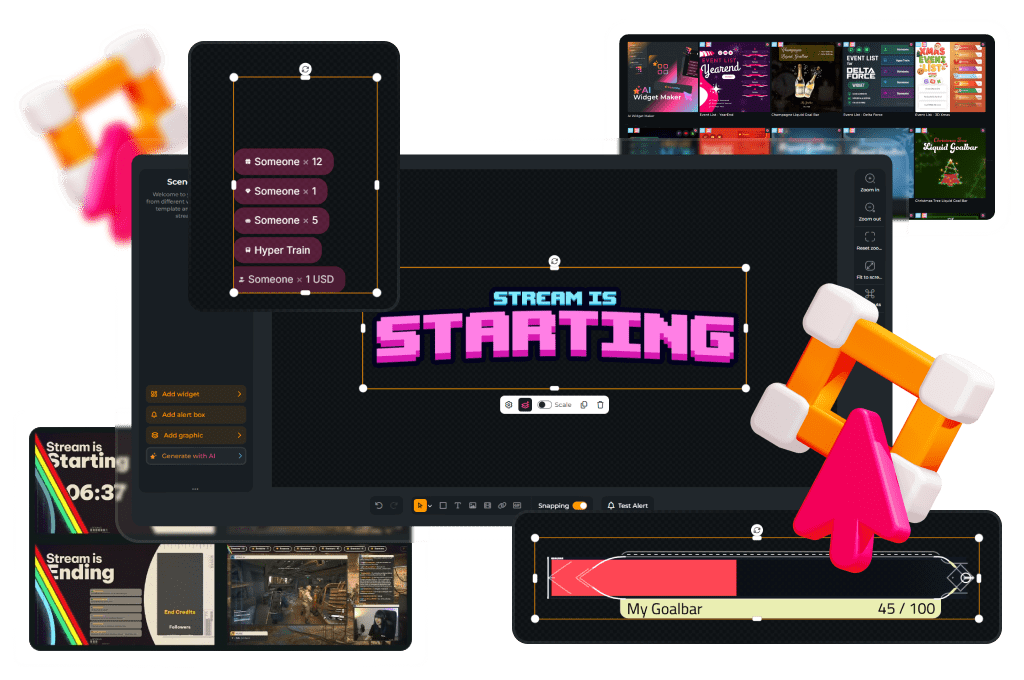
Create eye-catching, custom stream overlays with the stream overlay maker for Twitch, YouTube, and Kick. Whether you’re a beginner or a seasoned streamer, our free overlay maker allows you to design overlays that perfectly match your unique vibe. Choose from hundreds of customizable templates or start from scratch using over 12,000 stream assets. Let your creativity shine and build something truly your own.
Most Installed Stream Overlay Maker Creations
Pure Stream Overlay Pack
Chroma Stream Overlay Pack
Avoid Stream Overlay Pack
Easy Stream Overlay Pack
Simple Stream Overlay Pack
CleanValo Stream Overlay Pack
PixelWorld Stream Overlay Pack
Darkmode Stream Overlay Pack
FREE Stream Overlay Collection - Black-White
GlitchPro Stream Overlay Pack
DARKTECH Stream Overlay Pack
Synthrunner Stream Overlay Pack
Pure - Webcam Blank
Senpai-Volume1 Stream Overlay Pack
ArcadePro Stream Overlay Pack
All Free/Premium Stream Overlay Maker Creations
Windrose Animated Stream Overlay - Stormtide
Forza Horizon 6 Animated Stream Overlay - Slipstream
Heroes of Might and Magic Olden Era Animated Stream Overlay - Hexrealm
Tomodachi Life Living the Dream Animated Stream Overlay - Utopia
Retro Games Animated Stream Overlay – DotMatrix
Cozy Streams Animated Stream Overlay – Woodlume
Truck Simulator Animated Stream Overlay – Logistica
Crimson Desert Animated Stream Overlay – Oathtaker
Pokopia Animated Stream Overlay – Pockethaven
Animated Stream Overlay - SYS_CORE
Marathon Animated Stream Overlay - Killvector
Resident Evil Requiem Animated Stream Overlay – Dirgeveil
World of Warcraft Midnight Animated Stream Overlay – Netherglow
World of Warcraft Midnight Animated Stream Overlay – Nightspire
Resident Evil Requiem Animated Stream Overlay – Umbrequiem
ARC Raiders Animated Stream Overlay – Arcfall
Escape from Tarkov Animated Stream Overlay - Hideout
Hytale Animated Stream Overlay – Mythvale
Battlefield Stream Overlays Collection
Mascot Stream Overlays Collection
Your Custom Overlay Journey Starts Here
What Happy Customers Say About Our Stream Overlay Maker
Don’t just take our word for it. See what other creators say about the stream overlay maker.
One Pass. Everything Included.
Works with all broadcasting tools
Build custom overlays in the Scene Builder and use them with OBS Studio, Streamlabs, XSplit, and more. Easy to integrate with any setup.
Unlimited* asset downloads
Download emotes, badges, panels, and more static assets. *Our unlimited plan is subject to fair use.
AI-powered creations
Get 50 AI credits with your Stream Pass to generate custom stream widgets, webcam frames, emotes, and more.
Multistreaming ready
Multistream on Twitch, YouTube, and Kick with custom overlays and all the tools you need for a professional-looking livestream.
What You Can Do With the Stream Overlay Maker
From widgets to full designs – unique or ready to use
With the stream overlay maker, you have full creative control, whether you want to build something unique or start with a template. From interactive widgets to clean layouts, the stream overlay maker gives you everything you need to design overlays that match your style.
Create Your Own Overlay
Build your custom stream overlay from scratch using our free overlay maker. Choose from over 12,000 assets, including elements, graphics, and widgets, to craft a completely original setup. Perfect for creators who want full creative freedom with their custom overlays.
Work With Presets
Pick from hundreds of ready-made templates for Twitch, YouTube, or Kick. Customize colors, fonts, widgets, and scenes to fit your brand. Great for fast, high-quality results with our stream overlay maker.
Interactive Stream Maker
Keep your stream dynamic and your viewers involved. With widgets like alerts and chatboxes, you’re not just adding visuals, you’re creating real interaction inside your custom overlay.
Works With Any Broadcasting Tool
Use your custom overlay directly in OBS Studio, Meld Studio, Streamlabs, XSplit, and more. The stream overlay creator provides a browser source URL you can easily add to any broadcasting tool that supports browser-based overlays. Everything integrates seamlessly with your existing setup.
Horizontal & Vertical Layout
Create overlays that fit your content, whether you’re streaming in standard or vertical format. Perfect for Twitch, YouTube, Kick, or even YouTube Shorts.
Why Choose OWN3D Pro Overlay Maker?
- Limited creative freedom
- Clunky interfaces and browser sources overload
- No vertical layouts
- Generic templates only
- Can slow down your PC
- Browser-based Stream Overlay Maker
- Unlimited creative possibilities with simple, powerful tools
- Horizontal AND vertical stream layouts
- Big library with premade overlays or start your own
- Super easy to use, even for beginners
- Fast loading & resource-friendly
- Regularly updated with fresh content
- Works across Twitch, YouTube, and Kick
FAQs About Our Stream Overlay Maker
What is a stream overlay maker?
A stream overlay maker is an online tool that allows you to create and customize overlays for your stream, including webcam frames, alerts, animated overlays, widgets, and more. With our stream overlay maker, you can design overlays that match your content and personal brand.
Can I use the stream overlay maker for free?
Yes! You can start with 300+ free design elements. With the Stream Pass, you get access to hundreds of additional overlays and design elements. If you only need widgets, you can subscribe to the Widget Pass and still use the free designs for your stream.
Do I need to download anything to use the overlay stream maker?
No downloads required! The overlay stream maker runs entirely in your browser, or you can use the free OWN3D Pro Desktop App for easier setup and integration. You can generate a browser source URL and add it directly to OBS, Streamlabs, or any other compatible broadcasting tool.
Is the stream overlay maker compatible with OBS and Streamlabs?
Yes, the stream overlay maker works with all major broadcasting tools, including OBS Studio, Streamlabs, XSplit, and Meld Studio. You simply add the browser source link to your broadcasting tool.
Can I use the stream overlay maker for Twitch, YouTube, and Kick?
Absolutely! Our tool is designed to work seamlessly across these major streaming platforms. Whether you’re on Twitch, YouTube, or Kick, your overlay will look great and stay consistent.
Are there vertical overlays for TikTok or mobile streaming?
Yes! You can create both horizontal and vertical layouts using our stream layout maker, which makes it easy to design overlays for TikTok Live, for example. If you’re using TikTok Live Studio, our overlays work visually, but please note that labels and widgets are only supported for Twitch, YouTube, and Kick. For interactive features like alerts or follower goals, you can use external services like TikFinity alongside your stream.
Can I make animated overlays with this tool?
Yes, you can design animated stream overlays using our editor or customize pre-animated templates. These work perfectly with OBS and other tools that support browser sources.
How do I create a custom stream overlay?
Simply open the stream overlay creator, choose a blank canvas or template, and start adding your elements. You can fully customize colors, fonts, widgets, and layout – no design skills required.
What’s included with the Stream Pass?
The Stream Pass unlocks 100+ customizable stream overlays, 400+ templates, unlimited asset downloads, AI tools, and full access to the live stream overlay maker, all in one subscription.
Can I buy individual designs or widgets for the stream overlay maker without a Pass?
Absolutely! While the stream overlay maker offers many free options, you can also choose to buy and unlock your favorite premium designs or widgets separately if you don’t want to upgrade to the Widget Pass or Stream Pass.
This gives you full access to that specific product within the maker, allowing you to customize all purchased assets, alerts, or widgets to fit your brand. Take a look at our store to see which products can be purchased for the stream overlay maker. Once unlocked, you have unlimited access to use your purchased product with your account!
Keep in mind that each overlay pack is unique, so the specific assets, scenes, and widgets included can vary from design to design. To see exactly what you’re getting, you can always install the preview first.
One quick tip: Standard free access to the stream overlay maker normally includes a limit of 6 installable scenes. However, this limit does not apply to any premium pack you have purchased! Any overlay pack you buy and unlock can be installed regardless of the regular scene limit. If you have any more questions, feel free to reach out to our support team anytime!